

TT Keyboard, Commander Combo
Tt eSPORTS COMMANDER COMBO Multi Light Gaming Keyboard and Mouse Combo The Tt eSPORTS COMMANDER COMBO Multi Light Gaming Gear Combo combines a full-size gaming keyboard and ergonomic gaming mouse in a single package designed for gamers seeking responsive control, customisable lighting,...
Tt eSPORTS COMMANDER COMBO Multi Light Gaming Keyboard and Mouse Combo
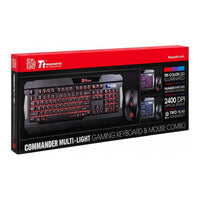
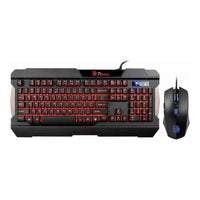
The Tt eSPORTS COMMANDER COMBO Multi Light Gaming Gear Combo combines a full-size gaming keyboard and ergonomic gaming mouse in a single package designed for gamers seeking responsive control, customisable lighting, and practical gaming features. Featuring tactile plunger switches, multi-colour illumination, anti-ghosting support, and an adjustable DPI gaming mouse, the COMMANDER COMBO delivers the functionality needed for both competitive and casual gaming.
Key Features
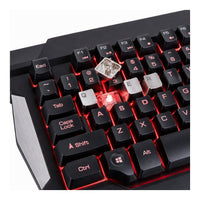
- Full-size gaming keyboard with tactile plunger switches designed to provide a mechanical-style typing feel.
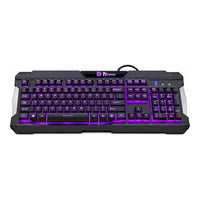
- Multi-colour LED illumination with Red, Blue and Purple lighting and adjustable brightness.
- Anti-ghosting functionality supports multiple simultaneous key presses during gameplay.
- Dedicated multimedia, shortcut, lighting and gaming function controls accessible without software.
- Gaming mouse with adjustable DPI settings up to 2400 DPI for precise control.
- Four mouse lighting effects including Static, Pulse, Pulse Jumping and Running modes.
- Ergonomic mouse design with six programmable buttons and comfortable palm support.
Tactile Plunger Switch Technology
The COMMANDER keyboard uses plunger switches combined with mechanical-style keycaps to provide tactile feedback and audible clicks with each keystroke. This design delivers a responsive typing and gaming experience while maintaining the familiarity of a traditional full-size keyboard layout.
Multi-Colour Gaming Illumination
Fully illuminated Red, Blue and Purple backlighting enhances both aesthetics and usability in low-light environments. Adjustable brightness settings and multiple lighting effects allow gamers to personalise their setup while maintaining visibility during gameplay.
Gaming-Focused Functionality
The keyboard includes practical gaming functions such as Windows Key Lock, WASD and Arrow Key switching, adjustable repeat rates, and anti-ghosting support. These features help improve control and minimise accidental interruptions while gaming.
Keyboard Hotkeys
COMMANDER Multi-Light Gaming Gear Combo | take command of the game
- Fn+F1 – Previous Track
- Fn+F2 – Play or Pause Track
- Fn+F3 – Next Track
- Fn+F4 – Stop Track
- Fn+F5 – Mute or Not
- Fn+F6 – Volume Down
- Fn+F7 – Volume Up
- Fn+F9 – Static Light
- Fn+F10 – Pulse Effect
- Fn+F11 – Pulse Jumping Effect
- Fn+F12 – Red to Blue Running
- Fn+Pg UP – Brightness UP
- Fn+Pg DOWN – Brightness Down
- Fn+Pause Break – Change Color
- (Affect in Static and Pulse Effect)
- Fn+↑ – Effect Speed Up
- (Affect in Light effect besides Static)
- Fn+↓ – Effect Speed Down
- (Affect in Light effect besides Static)
- Fn+Print SysRq – Lock Windows Key
- (And Turn Win to Ctrl)
- Fn+Print Num Lk – Lock Full Key
- (Keyboard lock and no signal)
Precision Gaming Mouse Included
The included optical gaming mouse offers on-the-fly DPI switching between multiple sensitivity levels and features six buttons for enhanced control. Multi-colour lighting effects and an ergonomic shape help complete the gaming experience.
Mouse Layout
COMMANDER Multi-Light Gaming Gear Combo | take command of the game
- A. Left click (mouse 1) button
- B. Right click (mouse 2) button
- C. Scroll wheel
- D. DPI switch (Default)
- E. Mouse button 5
- F. Mouse button 4
- G. Side-Panel Lighting (on both sides)
- Press DPI switch [d] – Switch DPI Level (Indicate by Color will light 5 sec Red 800 DPI / Blue 1600 DPI / Purple 2400 DPI )
- Press & Hold DPI Switch [d] and Press Left-Button [a] – Turn On/Off Light
- Press & Hold DPI Switch [d] and Press Scroll Button [c] – Change Lighting Effect (Static or Spectrum Running)
- Press & Hold DPI Switch [d] and Press Side-Button [f] – Red to Blue RUNNING SPEED (Three level speed. 3 Cycling / 9 Cycling / 15 Cycling IN ONE MIN)
Technical Specifications
| Specification | Details |
|---|---|
| Brand | Tt eSPORTS |
| Model | COMMANDER COMBO Multi Light |
| Manufacturer Part Number | |
| Product Type | Gaming Keyboard and Mouse Combo |
| Colour | Black |
| Interface | USB |
| Recommended Usage | Gaming |
| Cable Length | 1.8 m |
| Keyboard Type | Gaming Keyboard |
| Keyboard Layout | QWERTY |
| Keyboard Form Factor | Standard |
| Keyboard Switch Type | Plunger Switch |
| Keyboard Polling Rate | 125 Hz |
| Keyboard Backlighting | Full Red, Blue and Purple LED Backlighting |
| Anti-Ghosting | Yes |
| Multimedia Keys | 7 |
| On-Board Memory | No |
| Graphical User Interface | No |
| Keyboard Weight | 1254 g |
| Mouse Type | Optical Gaming Mouse |
| Mouse DPI | 800 / 1200 / 1600 / 2400 DPI |
| Mouse Sensor Type | Optical |
| Mouse Buttons | 6 |
| Mouse Lighting | Red, Blue and Purple LED Illumination |
| Mouse Lighting Effects | Static, Pulse, Pulse Jumping and Running Effects |
| Mouse Finish | Matte |
| Mouse Cable | 1.8 m Braided Cable |
| Mouse Weight | 144 g |
| Compatibility | Windows PC with USB Port |
| Weight | Keyboard: 1254 g Mouse: 144 g |
| Warranty | 2-year Carry-in |
Take control of your gaming setup with the Tt eSPORTS COMMANDER COMBO Multi Light and enjoy responsive gameplay, customisable lighting, and practical gaming features in one complete package.
Delivery
Free tracked delivery on all orders over R1,500. Standard delivery is 2–4 working days anywhere in South Africa.
Returns
Return any unused item in its original packaging within 14 days for a full refund. Faulty items are covered by the manufacturer's warranty and our hassle-free returns process.
Warranty & support
All products are covered by the manufacturer's warranty; periods vary by product and brand. For claims, contact support@weshoptech.co.za or call 010 541 0089.
Related new arrivals


